---
title: Form Menu
description: This section gives an overview of the form menu within the arranging director where you can print, edit and create forms in the system.
---
[Skip to content](https://support.tributetech.com/frontrunner/form-menu#main-content)
English
Show submenu for translations
[Register For The Customer Support Portal](https://support.tributetech.com/portal?hsLang=en)

Open main navigation
Close main navigation
- English
Show submenu for translations
- [Register For The Customer Support Portal](https://support.tributetech.com/portal)
- [Contact us](https://share.hsforms.com/1iDvar3xJSF2g-vDGycwdFAtkn7c)
[Contact us](https://share.hsforms.com/1iDvar3xJSF2g-vDGycwdFAtkn7c)
How can we help?
- There are no suggestions because the search field is empty.
1. [Frontrunner](https://support.tributetech.com/frontrunner?hsLang=en)
2. [Arranging Director](https://support.tributetech.com/frontrunner/arranging-director?hsLang=en)
# Form Menu
## This section gives an overview of the form menu within the arranging director where you can print, edit and create forms in the system.
This section allows you to quickly print forms for a client record.
Navigate to Arranging Director \> Forms.
The forms menu shows all of the forms that have been set to be visible and are therefore available for your funeral home’s use. The forms and their visibility are maintained by the funeral home and company-wide administrators via [System Settings \> Arranging Director Admin Form Library Maintenance \> Maintain Forms](https://www.frontrunnermanual.com/arranging-director-admin#Forms).
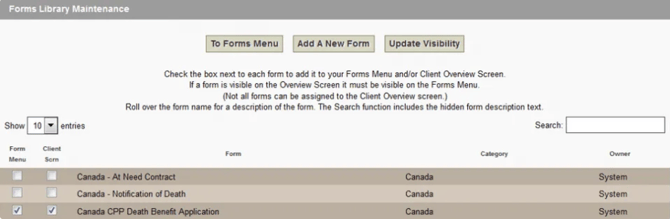
To create a form, simply click the form name. When a form is selected, use the dropdown to select the client record. When the form opens you may edit any information that is pre-filled on the form and fill in any other blank fields before printing. Use the File \> Print functions from your browser to print the form.
\*\* Data changed or added on a form is NOT saved in the database. To permanently modify client data, use the client information editing screens.
- [Dashboard](https://support.tributetech.com/frontrunner/dashboard?hsLang=en)
- [Records](https://support.tributetech.com/frontrunner/records?hsLang=en#main-content)
- [Management Records](https://support.tributetech.com/frontrunner/records?hsLang=en#management-records)
- [Book of Memories](https://support.tributetech.com/frontrunner/book-of-memories?hsLang=en)
- [Website Editor (Duda)](https://support.tributetech.com/frontrunner/website-editor-duda?hsLang=en#main-content)
- [List of Widgets](https://support.tributetech.com/frontrunner/website-editor-duda?hsLang=en#list-of-widgets)
- [Editing Features](https://support.tributetech.com/frontrunner/website-editor-duda?hsLang=en#editing-features)
- [Editor Overview](https://support.tributetech.com/frontrunner/website-editor-duda?hsLang=en#editor-overview)
- [Website Tab (Wireframe)](https://support.tributetech.com/frontrunner/website-tab-wireframe?hsLang=en#main-content)
- [Website Modules](https://support.tributetech.com/frontrunner/website-tab-wireframe?hsLang=en#website-modules)
- [Stationery Printing](https://support.tributetech.com/frontrunner/stationery-printing?hsLang=en)
- [Memorial FX Videos](https://support.tributetech.com/frontrunner/memorial-fx-videos?hsLang=en)
- [Arranging Director](https://support.tributetech.com/frontrunner/arranging-director?hsLang=en)
- [Marketing Center](https://support.tributetech.com/frontrunner/marketing-center?hsLang=en)
- [System Features](https://support.tributetech.com/frontrunner/system-features?hsLang=en)
- [Partner Integrations](https://support.tributetech.com/frontrunner/partner-integrations?hsLang=en)
- [General Settings](https://support.tributetech.com/frontrunner/general-settings?hsLang=en)
- [Management System Settings](https://support.tributetech.com/frontrunner/management-system-settings?hsLang=en)
- [FAQ](https://support.tributetech.com/frontrunner/faq?hsLang=en)
[](https://www.tributetech.com/)
Copyright © 2026, Tribute Technology