
Package prices are handled in MiMS in 1 of 2 ways; through Finance Packages or Service Bundles.
Finance Packages
The Finance packages are designed to provide several services\products to clients at a single combined price.
**This tab is not available in all states / provinces.
Finance Package Setup
Setting up the Finance Packages is located at the bottom of the second column of the Setup area.

When setting up Finance Packages, enter in the name of the package, the price of the package and then a description of what all is included in the package.
**You may enter as many finance packages as you like.
Using Finance Packages
Finance Packages are used on Tab 2 – Package of the Finance area.
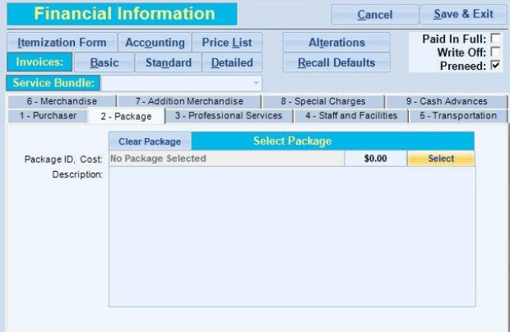
- Click on the “Select” button.
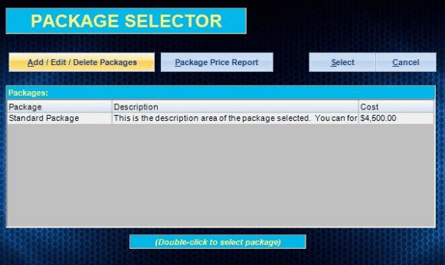
- In the new window choose the package you want to use and click “Select” or click the “Add/Edit/Delete” button to work with your Finance Packages.
- If you desire to print out a report of all the Finance Packages you offer click on the “Package Price Report” button.
- After selecting your package the Package Name, price, and description shall be loaded into Tab.
Service Bundles
Service Bundles are a way to provide several services / items under 1 easy selectable option. For example if you have 5 things that you always provide with a traditional funeral, then you could setup a service bundle for traditional funerals that already has the 5 items included in it.
Service Bundle Setup
Service Bundle Setup is located at the bottom of the last column of the Setup area.
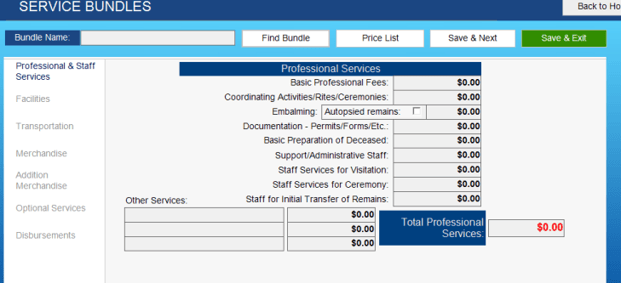
- In this area give the service bundle a name in the box next to the “Service Bundle” box.
- Go through each tab entering in the amounts for the service bundle that are always standard.
**Do not forget about the “Discount” and “Explanation of Charges” boxes at the bottom. - Once you have finished entering in your service bundle click “Save – Next” and then enter in your next service bundle or click the “Save-Exit” button.
**You may enter as many service bundles as you like.
Using Service Bundles
Service bundles are used in the Finance area. They are actually located just above the tabs on the left side.

To select a service bundle:
- Click on the drop-down for the service bundles.
- Click on the service bundle you want to use.
- Confirm the warning prompt.

- All the finance prices are now replaced and all you have to do is review your finance information and make any needed adjustments.