
The Documents Menu offers the following choices that will load a document for you:
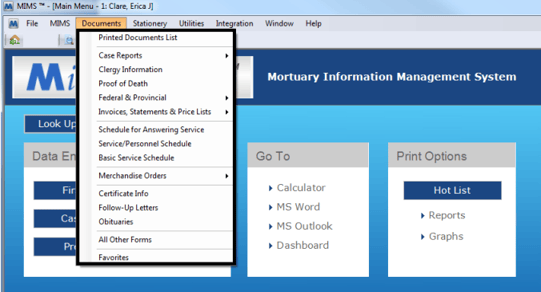
Printed Document List
This will open up the window to display a list of Printed documents.
Case Reports
This item contains access to the case reports that are supplied with MiMS.
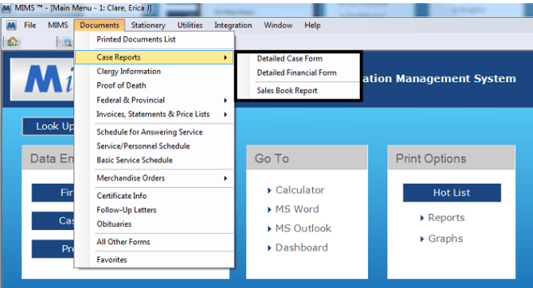
Detailed Case Form: This will load the Detailed Case Report which gives detailed information about the current case you have up in MiMS.
Detailed Financial Form: Similar to the Detailed Case Report this button will load the Detailed Financial Report which gives detailed financial information about the current case you have up in MiMS.
**This document is also available when closing the Detail Case Report. You will be asked if you want to look at Part 2 of the report and if you say yes it will load this form.
Sales Book Report: This report will give a listing of the breakdown of the income that would go into each of the accounts used in the setup of the accounting module.
**The Sales Book is a MiMS generated report that is only available with the accounting module enabled.
Clergy Information
This button will load the Clergy Record document.
Federal & State
This item contains many items that are directly related to State and Federal documents.
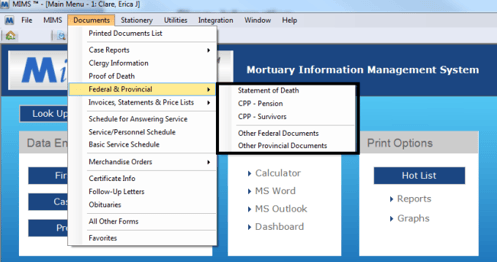
Many of the buttons in this area are self explanatory as to what document they load and will vary depending on which State or Province you are located in.
The buttons we provide do not cover all available federal or state documents so in the event you need to load a federal or state document other than the provided options, use one of the following 2 options located last in the list:
- Other Federal Forms
- Other State Forms
Invoices, Statements & Price Lists
This contains many items related to finances, and price lists.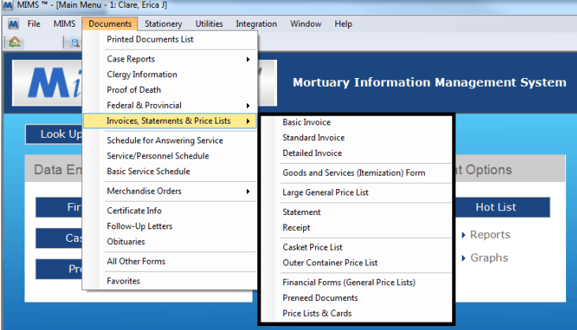
Many of the buttons in this area are self explanatory as to what document they load. The available buttons are:
Basic Invoice, Standard Invoice, Detailed Invoice, Goods and Services (Itemization), Large General Price List, Small General Price List, Statement, Casket Price List, and Out Container Price List
The buttons provided do not cover all available finance or price list documents so in the event you need to load a financial or price list document other then the provided options use one of the following 2 options located last in the list:
- Financial Form (General Price Lists)
- Pre-need Documents
- Price List & Cards
Schedule for Answering Service
This item loads a report that gives a listing of all future visitations and services that you can print out and fax to your answering service or use for your own information.
Service/Personnel Schedule
This item loads a report that lists all service information on each case and whom is assigned to work the events for the case.
Basic Service Schedule
This item loads a report that gives the same information as the Schedule for Answering Service but with information layout in a column format.
Merchandise Orders
This item contains shortcuts to the merchandise order forms to print out a fax order sheet.
Certificate Info
This item loads a Select File window to choose a vital statistic form for any other state/province that MiMS currently has at least 1 client in.
The purpose of the vital statistic forms are designed to load information as close to the death certificate information as possible for the given chosen state / province. This form can then be used for your own personal needs or to send with a body being shipped to another state.
Follow-Up Letters
This item will load a Select File window to choose a follow up letter to print.
Obituaries
This item is used to access the obituary documents to create an obituary. In the event that an obituary has been saved to the case currently open in MiMS the system will ask you first if you would like to load that saved obituary.
All Other Forms
This item will load a Select File window to choose from many forms that don’t have some other specific place they could go.
Favorites
This item displays all document favorites that have been setup in MiMS.