
The File Menu in MiMS offers the following choices:
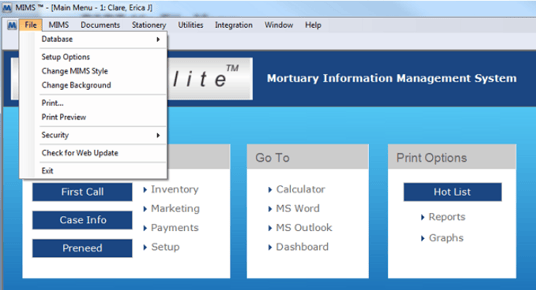
Database
This is where all options for working with the data files are located. There are several options located within this section:
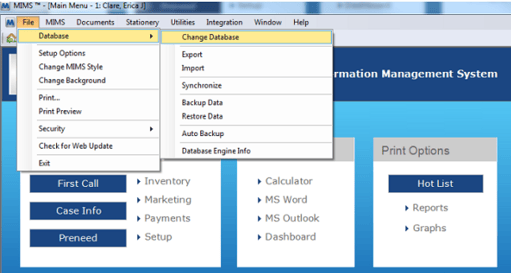
Change Database
In the case you have multiple different MiMS data files you work with, this option will take you to a screen that will allow changing which database your MiMS is looking at.
Export
This option will take you to a window that will give you options on how to export your MiMS data take.
Import
This option will take you to a window that will give you options on how to import your MiMS data take.
Synchronize
This option allows you to combine the data between 2 different MiMS databases.
Backup Data
This option gives you the ability to backup your MiMS data.
Restore Data
This option gives you the ability to restore a MiMS backup file.
Auto Backup
This option gives you the ability to adjust the MiMS Auto-backup function.
Database Engine Info
This option is to give you detailed information regarding the MiMS database you are currently connected to.
Setup Options
This takes you to the MiMS Setup Options section.
Change Background
You can change the MiMS background images by selecting this option and cycling through the available choices or choosing your own special background, if desired.
Accounting Options
This is where the basic setup for communicating to Quickbooks or Peachtree would be setup.
**This option is only available if the MiMS accounting module is enabled.
Set Account Number
This is where the chart of accounts for Quickbooks or Peachtree would be setup to match the MiMS Finances.
**This option is only available if the MiMS accounting module is enabled.
This will print out the current window open in MiMS.
Print Preview
This button gives a preview of the current MiMS window and what it would like of printed, before printing.
Security
This is where all options related to the MiMS Security would be located.