
The "Manage News and Events" section can be used to add news or company/community events to display on website pages. This feature is particularly useful if you want a page on your website where you can post information about upcoming community events. The functionality of this section works very similarly to the blog functionality on the website.
Managing News and Events
To access the setup and entry section for news and events, click on the site settings icon in the upper right corner and click on "Manage News and Events".

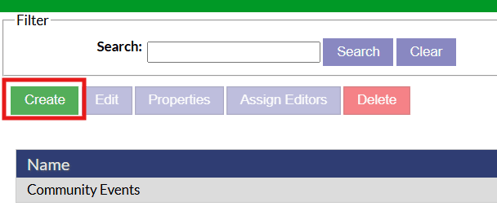
On the news and events page, categories can be created to group different news or events into. Click the green create button to add a new category.
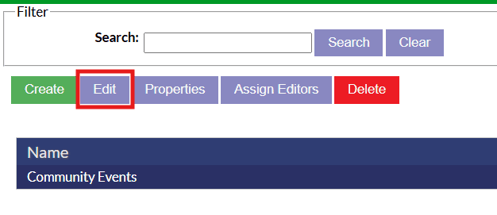
To enter into a category and added entries to appear on the website, highlight the category and click the edit button.
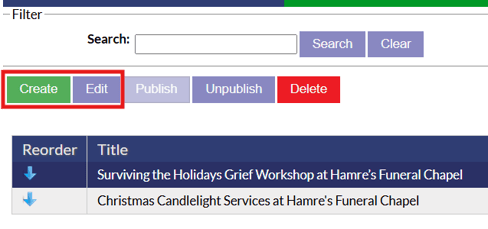
Once inside a category, you will see all the entries listed out that are in this category. New entries can be added by clicking the create button and existing entries can be edited by clicking the edit button.
When creating a new entry for the news and events section, title is all that is required for the event to be saved. Options are available though to add an event date, publish date and description.

As soon as an event is saved, it will appear on the site anywhere that is set up as a news and events page with that category.
Displaying News and Events On Websites
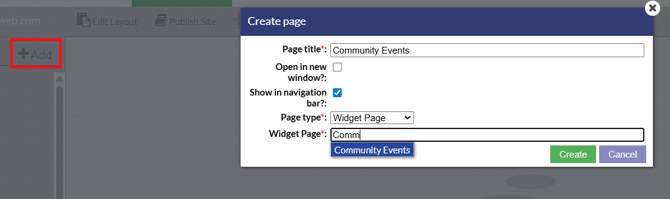
There are two ways that you can set up the news and events entries to display on your website. A widget page can be created using the category of events you want to display. To do this, click the add new page icon in the website editor, select the widget page type and type in the name of the events category from the manage news and events section to fill the page with. A page on the website will now be created that will display any event that is within that category of the news and events section.
The second option is to add a widget content box on an existing page to display news and events. To do this, set a content box type on a page to widget. From the list of widgets, select the news and events widget.
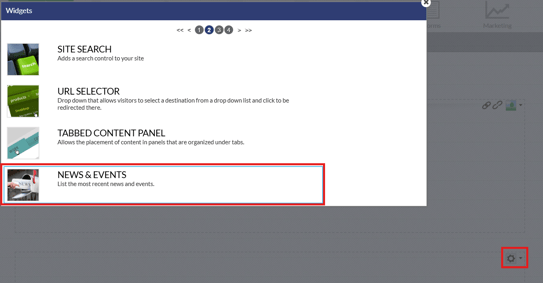
A few setup options will appear for the news and events box. A specific category can be set in the news feed section, number of events to display, max height for the section, if only titles should show and options for title display.

Once you have implemented the widget box, save and publish your changes in the site editor to have that section appear on the live website.