
The ASD integration allows for case and service details to be sent directly to ASD through SRS. On the export page, a tab called ASD FuneralSync is available where the integration can be set up.
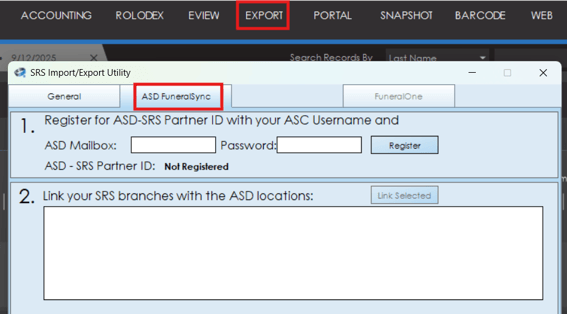
To set up the ASD integration, your ASD Mailbox number and Password will be required. Additional information like SRS Partner ID will need to be set up by SRS support, so it is recommended to contact SRS support at support@srscomputing.com when trying to set up this integration.
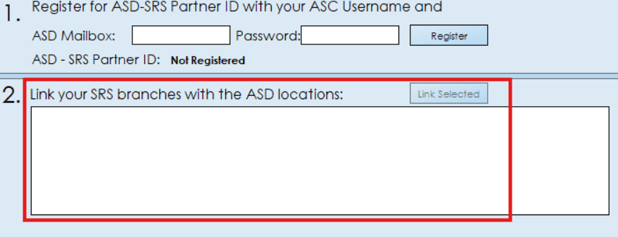
Once the ASD account is connected, step 2 will allow you to link specific branches in SRS with the various ASD locations.
Sending Information To ASD
Once ASD is connected to your system, service information and client details can be set to ASD via the client tab. On the client tab, a toggle is available called "Answering Service", this toggle box must be checked in order for client information to be sent to ASD.
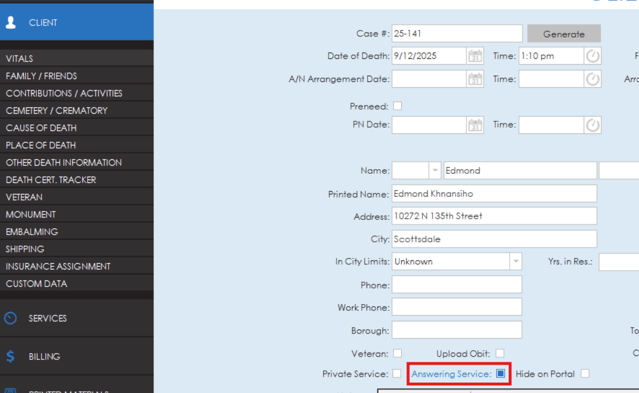
For information to send to ASD, a date of death is required on the case and a service with a future date. If a case has these two things and the Answering Service box is selected, updates of the client information and service information will be sent to ASD every 15-20 minutes.