
In Prospect, settings are more simplified then in other systems like Procession and Phoenix.
Preference Settings In Prospect
The preferences tab on the settings page for Prospect only contains a few settings that can be customized.
- Automatically Increment Case Number
- This setting will toggle if case numbers will automatically be generated incrementally when case number generation is being used.
- All Reps Can View All Leads
- This setting controls whether reps can view all leads in the system or only leads that are assigned to them or they have been given access to view.
- Automatically Assign New Leads To Logged In User
- This setting will determine if new leads enter to the system will auto assign to the logged in user.
- Program Timeout
- The program timeout setting will determine how long it takes in minutes before the program times out and signs the user out. If set to zero minutes, no timeouts will happen.
The setup drop down button is also available at the bottom of the section to make changes to drop down options for fields in the system. This functionality works the same as the setup drop down functionality in Procession and Phoenix.
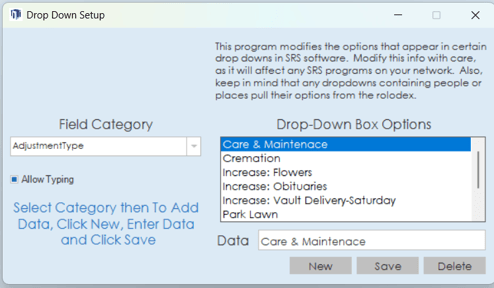
Branch Settings In Prospect
The branches section of the settings page in Prospect allows for branch details to be configured. Simply click on a branch on the right side of the section to open the details on the left side. Information regarding branch name, address, city, state, zip, county, phone, fax, email and website can be edited. Price lists can also be edited in this section by clicking the price list button.
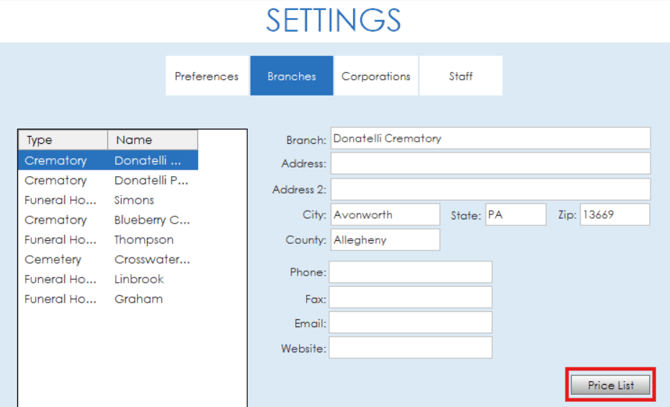
The price list functionality in Prospect works the same way that it does in Procession and Phoenix. For more details on how to edit the price list, view the Price List article for more information.
Corporation Settings In Prospect
The corporation settings in Prospect is where certain corporation level information can be edited. Name and license number for the corporation can be added, along with dates for the most recent vault, casket and general price list. Federal or State employer ID numbers can be added and account interest percentages can be set. Toggles are available at the bottom of the section to enable export and record lock capabilities.

Staff Settings In Prospect
In Prospect, the staff settings section functions in the same way that it does in other systems like Procession and Phoenix. For more information on the staff settings, visit the Staff Settings article for a detailed overview.