
The Private Guestbook feature is a useful feature if a family would like to keep condolence messages private instead of having the messages post on the public Tribute Wall. The Private Guestbook setting can be found on the edit page of an obituary, just below the basic information.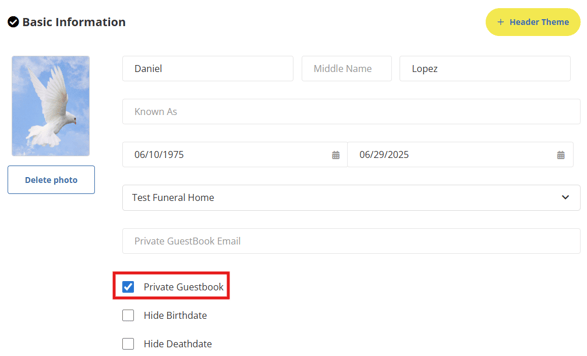
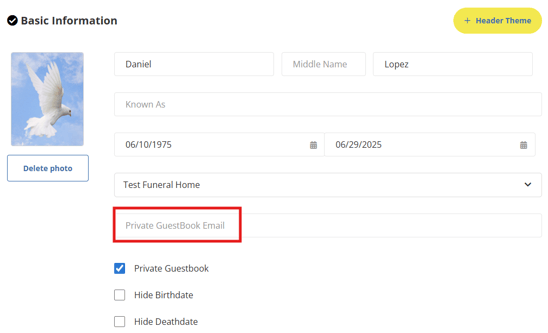
To enable the Private Guestbook, simply check off the Private Guestbook setting and enter an email to the Private Guestbook Email section. Whichever email is entered as the Private Guestbook Email will receive all the condolence messages to their email address directly.
**The Private Guestbook email feature does not allow for multiple email addresses to be added, only one email address can be added as the Private Guestbook email.
When Private Guestbook is enabled, a message will be displayed in the Tribute Wall section of the obituary page explaining to visitors that the Tribute Wall is private and all memories will be shared directly with the family.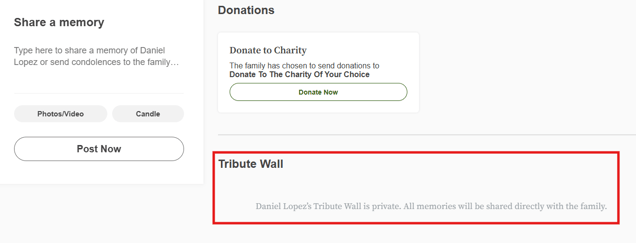
Visitors can still post a condolence message but they will not see it appear on the Tribute Wall publicly.
**The Private Guestbook is a good alternative option if a family wants the tribute wall disabled on an obit page. If you want the Tribute Wall completely disabled, Tribute Website support can assist with that.