
With the AI Event Creation feature enabled, after you save an obituary, TMS automatically creates draft entries in the Events section for events such as visitations, funeral services, celebrations of life, burials, and receptions.
Important: AI-created events are not final. Always review the event details and make any necessary changes before continuing your case workflow.
How AI Event Creation works
- Enter a case's obituary information as usual, including service dates, times, locations, and relevant notes.
- Save the obituary.
- An AI process automatically reads the obituary and creates event drafts from the details it can identify. You do not need to click a separate button for this to happen.
- If any events are detected in the obituary, a section above the obituary will show how many events were detected along with a button to "Review Events".
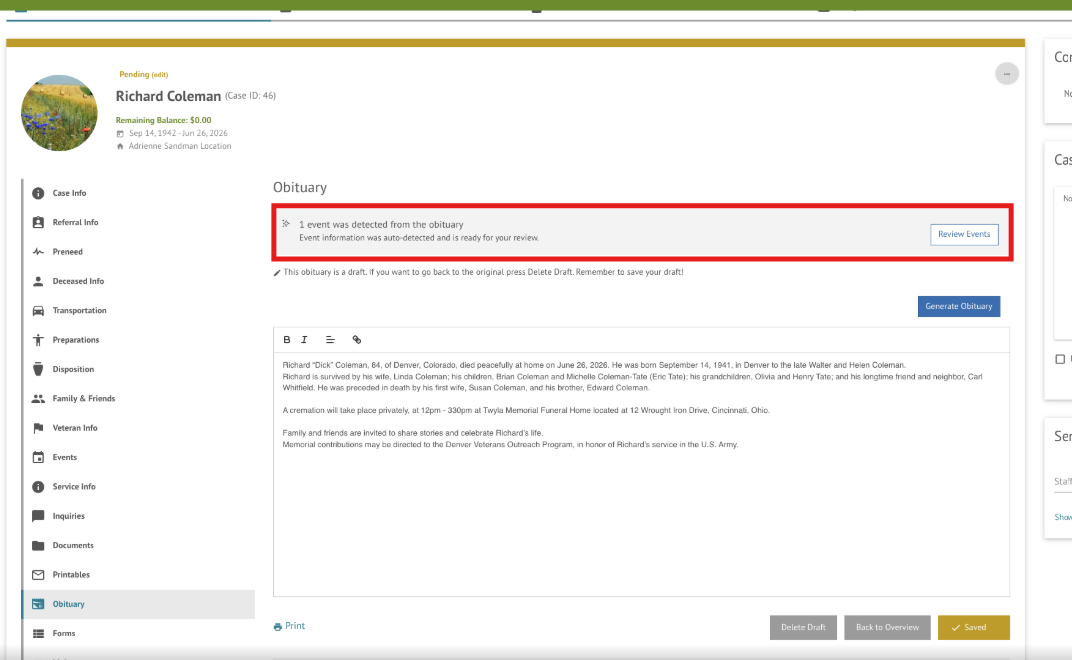
- Navigate to the Events section to view any events the AI added. If an event is added by AI it will be marked with "AI Created".
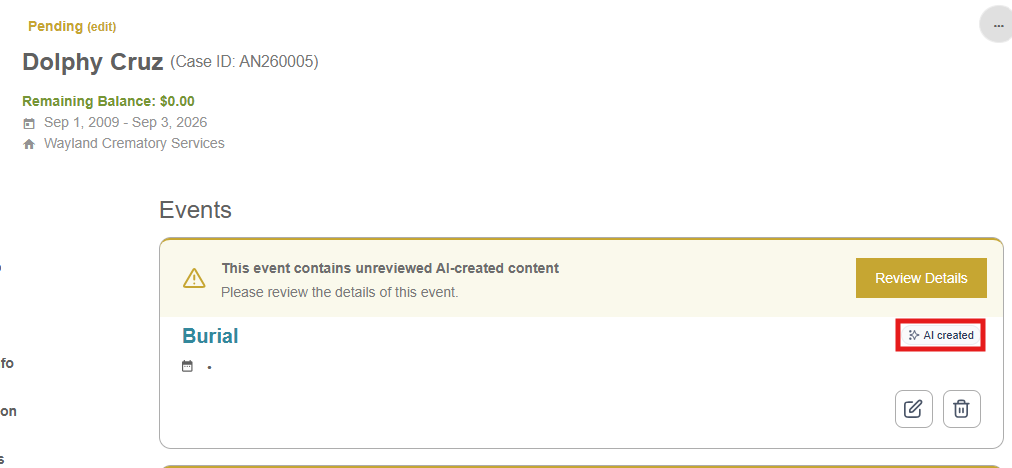
What this means for you: Details entered in the obituary can help populate the case events without requiring you to re-enter the same information manually.
Frequently Asked Questions
Do I need to run the AI separately?
No, AI Event Creation runs automatically when you save a case.
Can AI overwrite events I already added to the events section?
No. If events already exist on the case, automatic event creation does not run.
Can AI events be edited?
Yes. AI-created events can be edited like other case events. Review and correct the details before confirming the event.